

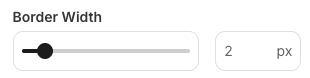
Fields cannot be dependent on sliders as they always have a value.
Compatibility
Properties
string
required
slider - the type of the componentstring
required
A unique internal-only identifier that is posted to an app’s plugin server to share values inputted by the creator
string
required
Creator-facing identifier that is shown in the plugin environment (64 character limit)
number
required
Maximum value allowed on the slider
number
required
Minimum value allowed on the slider
number
required
Increment value for slider movement and input validation
number
required
Default value when the component first loads
boolean
Determines whether the creator must set a value before proceeding, defaults to
falsestring
Brief creator-facing explanation that clarifies the component’s purpose and usage (256 character limit. Supports markdown:
[text](url), **bold**, and *italic*)string
Unit or label displayed after the value (3 character limit, defaults to null). If
null or absent, the suffix won’t showobject array
Allows for the field to be shown conditionally. dependent on other fields. See dependencies page for more details.