> ## Documentation Index
> Fetch the complete documentation index at: https://developers.kit.com/llms.txt
> Use this file to discover all available pages before exploring further.

# OAuth authorization

> Setting up OAuth authorization for your plugins

The following guide helps guide you through the endpoints required for plugin authorization. For more details on setting up app authorization flows as a whole, check out our [app authentication guide here.](/kit-app-store/authentication)

## Plugin OAuth server setup

For OAuth, you'll need to support 4 endpoints:

* Getting an authorization code grant
* Requesting an access token using an authorization code
* Requesting an access token using a refresh token
* Revoking an access token

The endpoints must accept the requests outlined below and return responses minimally matching the outlined response shapes (additional attributes can be returned but we require at least what appears in these docs).

The redirect URI we'll use for all of our requests will be [https://app.kit.com/apps/install](https://app.kit.com/apps/install).

We'll use Bearer Authorization to include the user's access token on all the requests we make to your endpoints.

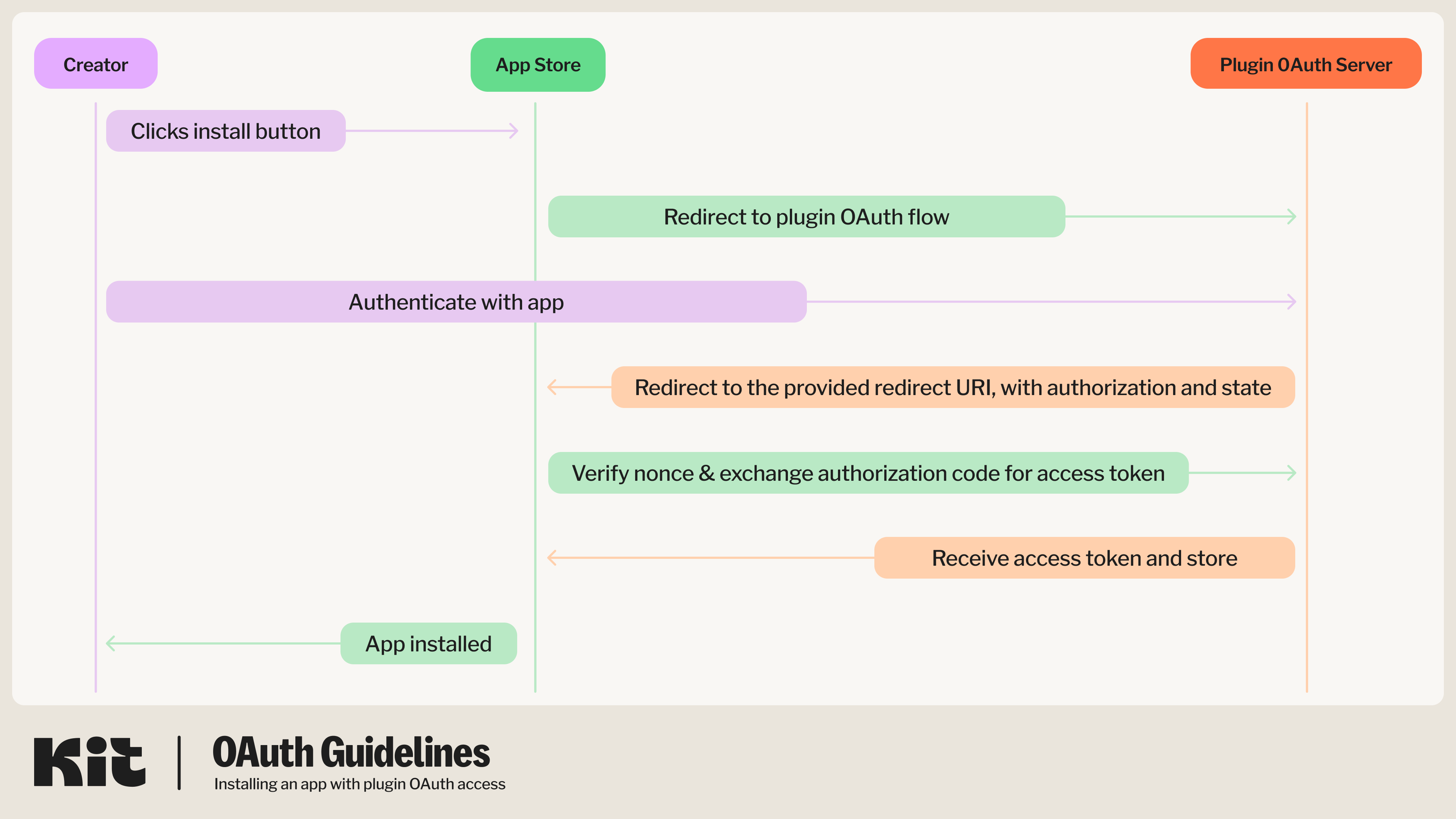
<Note>A diagram for this flow for apps that only require Plugin OAuth authentication can be found below. For guidance on apps that also require API authentication, also check out the [app authentication guide here.](/kit-app-store/authentication).</Note>

<img width="800" alt="OAuth app flow" src="https://mintcdn.com/kit-314e57c1/ohR8KbVxvspIDffR/images/plugins/plugin-only-oauth.png?fit=max&auto=format&n=ohR8KbVxvspIDffR&q=85&s=d57cf51d6aa277eb2d5b9307b2963596" data-path="images/plugins/plugin-only-oauth.png" />

### Get an authorization code grant

We will start the OAuth process by making a GET request to your provided authorization URL:

```
GET <YOUR_CONFIGURED_AUTHORIZATION_URL>?
  client_id=<YOUR CONFIGURED CLIENT ID>&
  response_type=code&
  redirect_uri=https://app.kit.com/apps/install
```

<AccordionGroup>
  <Accordion title="Query Parameters">
    <ParamField path="client_id" type="string" required="true">
      Your plugin's configured Client ID
    </ParamField>

    <ParamField path="response_type" type="string" required="true">
      `code`
    </ParamField>

    <ParamField path="redirect_uri" type="string" required="true">
      `https://app.kit.com/apps`
    </ParamField>

    <ParamField path="state" type="string">
      Custom state to pass to the redirect\_uri and/or to protect from XSRF
    </ParamField>
  </Accordion>

  <Accordion title="Code samples">
    <CodeGroup>
      ```shell shell theme={null}
          curl -G GET <YOUR CONFIGURED AUTHORIZE URL> \
              -H 'Accept: text/html'
              -d "client_id=<YOUR CONFIGURED CLIENT ID>"
              -d "response_type=code"
              -d "redirect_uri=https://app.kit.com/apps/install"
      ```

      ```javascript Javascript theme={null}
          const headers = {
              'Accept':'text/html'
          };

          fetch('<YOUR CONFIGURED AUTHORIZE URL>?client_id=<YOUR CONFIGURED CLIENT ID>&response_type=code&redirect_uri=https://app.kit.com/apps/install',
          {
              method: 'GET',
              headers: headers
          })
          .then(function(res) {
              return res.json();
          }).then(function(body) {
              console.log(body);
          });
      ```

      ```ruby Ruby theme={null}
          require 'rest-client'
          require 'json'

          headers = {
              'Accept' => 'text/html'
          }

          result = RestClient.get '<YOUR CONFIGURED AUTHORIZE URL>?client_id=<YOUR CONFIGURED CLIENT ID>&response_type=code&redirect_uri=https://app.kit.com/apps/install',
              params: {
              }, headers: headers

          p JSON.parse(result)
      ```

      ```python Python theme={null}
          import requests
          headers = {
              'Accept': 'text/html'
          }

          r = requests.get('<YOUR CONFIGURED AUTHORIZE URL>?client_id=<YOUR CONFIGURED CLIENT ID>&response_type=code&redirect_uri=https://app.kit.com/apps/install', headers = headers)

          print(r.json())
      ```
    </CodeGroup>
  </Accordion>

  <Accordion title="Responses">
    **302:** Redirects to `https://app.kit.com/apps` with authorization code parameter
  </Accordion>
</AccordionGroup>

### Get a new token using an authorization code

We will then exchange the returned authorization code for a new access token by making a POST to your configured token URL, with a body like so:

```json theme={null}
{
  "client_id": "<YOUR CONFIGURED CLIENT ID>",
  "client_secret": "<YOUR CONFIGURED CLIENT SECRET>",
  "grant_type": "authorization_code",
  "code": "abc123",
  "redirect_uri": "https://app.kit.com/apps"
}
```

<AccordionGroup>
  <Accordion title="Query Parameters">
    Response schema: *application/json*

    <ParamField path="client_id" type="string" required="true">
      Your plugin's configured Client ID
    </ParamField>

    <ParamField path="client_secret" type="string" required="true">
      Your plugin's configured Client Secret
    </ParamField>

    <ParamField path="grant_type" type="string" required="true">
      `authorization_code`
    </ParamField>

    <ParamField path="code" type="string">
      The code received via the redirect uri query params
    </ParamField>

    <ParamField path="redirect_uri" type="string" required="true">
      `https://app.kit.com/apps`
    </ParamField>
  </Accordion>

  <Accordion title="Code samples">
    <CodeGroup>
      ```shell shell theme={null}
          curl -X POST <YOUR CONFIGURED TOKEN URL> \
              -H 'Content-Type: application/x-www-form-urlencoded' \
              -H 'Accept: application/json' \
              -d '{
                  "client_id": "<YOUR CONFIGURED CLIENT ID>",
                  "client_secret": "<YOUR CONFIGURED CLIENT SECRET>",
                  "grant_type": "authorization_code",
                  "code": "abc123",
                  "redirect_uri": "https://app.kit.com/apps"
      }
      ```

      ```javascript Javascript theme={null}
          const inputBody = '{
              "client_id": "<YOUR CONFIGURED CLIENT ID>",
              "client_secret": "<YOUR CONFIGURED CLIENT SECRET>",
              "grant_type": "authorization_code",
              "code": "abc123",
              "redirect_uri": "https://app.kit.com/apps"
          }';
          const headers = {
              'Content-Type':'application/x-www-form-urlencoded',
              'Accept':'application/json'
          };

          fetch('<YOUR CONFIGURED TOKEN URL>',
          {
              method: 'POST',
              body: inputBody,
              headers: headers
          })
          .then(function(res) {
              return res.json();
          }).then(function(body) {
              console.log(body);
          });
      ```

      ```ruby Ruby theme={null}
          require 'rest-client'
          require 'json'

          headers = {
              'Content-Type' => 'application/x-www-form-urlencoded',
              'Accept' => 'application/json'
          }
          payload = {
              "client_id" => "<YOUR CONFIGURED CLIENT ID>",
              "client_secret" => "<YOUR CONFIGURED CLIENT SECRET>",
              "grant_type" => "authorization_code",
              "code" => "abc123",
              "redirect_uri" => "https://app.kit.com/apps"
          }

          result = RestClient.post '<YOUR CONFIGURED TOKEN URL>', payload,
              params: {
              }, headers: headers

          p JSON.parse(result)
      ```

      ```python Python theme={null}
          import requests
          headers = {
              'Content-Type': 'application/x-www-form-urlencoded',
              'Accept': 'application/json'
          }
          json = {
              "client_id": "<YOUR CONFIGURED CLIENT ID>",
              "client_secret": "<YOUR CONFIGURED CLIENT SECRET>",
              "grant_type": "authorization_code",
              "code": "abc123",
              "redirect_uri": "https://app.kit.com/apps"
          }

          r = requests.post('<YOUR CONFIGURED TOKEN URL>', headers = headers, json = json)

          print(r.json())
      ```
    </CodeGroup>
  </Accordion>

  <Accordion title="Responses">
    <p>**200:** Returns a token</p>

    ```json theme={null}
        {
        "access_token": "YOUR_ACCESS_TOKEN_HERE",
        "expires_in": 172800,
        "refresh_token": "YOUR_REFRESH_TOKEN_HERE",
        "created_at": 1710270147
        }
    ```

    <p>Response schema: *application/json*</p>

    <ResponseField name="access_token" type="string" required={true}>
      Access token for a user in the plugin app's system
    </ResponseField>

    <ResponseField name="expires_in" type="integer" required={true}>
      When the access token expire in seconds
    </ResponseField>

    <ResponseField name="refresh_token" type="string" required={true}>
      Refresh token that can be used to generate a new access token once this one expires
    </ResponseField>

    <ResponseField name="created_at" type="integer" required={true}>
      When the access token was created
    </ResponseField>
  </Accordion>
</AccordionGroup>

### Get a new token using a refresh token

When the previous access token expires, we will request a new access token by making a POST to your configured refresh token URL, with a body like so:

```json theme={null}
{
  "client_id": "<YOUR CONFIGURED CLIENT ID>",
  "grant_type": "refresh_token",
  "refresh_token": "string"
}
```

<AccordionGroup>
  <Accordion title="Query Parameters">
    Response body schema: *application/json*

    <ParamField path="client_id" type="string" required="true">
      Your plugin's configured Client ID
    </ParamField>

    <ParamField path="grant_type" type="string" required="true">
      `refresh_token`
    </ParamField>

    <ParamField path="refresh_token" type="string" required="true">
      `Refresh token`
    </ParamField>
  </Accordion>

  <Accordion title="Code samples">
    <CodeGroup>
      ```shell shell theme={null}
          curl -X POST <YOUR CONFIGURED REFRESH TOKEN URL> \
              -H 'Content-Type: application/x-www-form-urlencoded' \
              -H 'Accept: application/json' \
              -d '{
                  "client_id": "<YOUR CONFIGURED CLIENT ID>",
                  "grant_type": "refresh_token",
                  "refresh_token": "abc123"
              }'
      ```

      ```javascript Javascript theme={null}
          const inputBody = '{
              "client_id": "<YOUR CONFIGURED CLIENT ID>",
              "grant_type": "refresh_token",
              "refresh_token": "string"
          }';
          const headers = {
              'Content-Type':'application/x-www-form-urlencoded',
              'Accept':'application/json'
          };

          fetch('<YOUR CONFIGURED REFRESH TOKEN URL>',
          {
              method: 'POST',
              body: inputBody,
              headers: headers
          })
          .then(function(res) {
              return res.json();
          }).then(function(body) {
              console.log(body);
          });
      ```

      ```ruby Ruby theme={null}
          require 'rest-client'
          require 'json'

          headers = {
              'Content-Type' => 'application/x-www-form-urlencoded',
              'Accept' => 'application/json'
          }
          payload = {
            "client_id" => "<YOUR CONFIGURED CLIENT ID>",
            "grant_type" => "refresh_token",
            "refresh_token" => "abc123"
          }

          result = RestClient.post '<YOUR CONFIGURED REFRESH TOKEN URL>', payload,
              params: {
              }, headers: headers

          p JSON.parse(result)
      ```

      ```python Python theme={null}
          import requests
          headers = {
              'Content-Type': 'application/x-www-form-urlencoded',
              'Accept': 'application/json'
          }
          json = {
              "client_id": "<YOUR CONFIGURED CLIENT ID>",
              "grant_type": "refresh_token",
              "refresh_token": "abc123"
          }

          r = requests.post('<YOUR CONFIGURED REFRESH TOKEN URL>', headers = headers, json = json)

          print(r.json())
      ```
    </CodeGroup>
  </Accordion>

  <Accordion title="Responses">
    <p>**200:** Returns a token</p>

    ```json theme={null}
        {
            "access_token": "YOUR_NEW_ACCESS_TOKEN_HERE",
            "expires_in": 7200,
            "refresh_token": "YOUR_NEW_REFRESH_TOKEN_HERE",
            "created_at": 1710271006
        }
    ```

    <p>Response schema: *application/json*</p>

    <ResponseField name="access_token" type="string" required={true}>
      Access token for a user in the plugin app's system
    </ResponseField>

    <ResponseField name="expires_in" type="integer" required={true}>
      When the access token expire in seconds
    </ResponseField>

    <ResponseField name="refresh_token" type="string" required={true}>
      Refresh token that can be used to generate a new access token once this one expires
    </ResponseField>

    <ResponseField name="created_at" type="integer" required={true}>
      When the access token was created
    </ResponseField>
  </Accordion>
</AccordionGroup>

### Revoke an access token

When your app is uninstalled by a creator, we will make a POST request to your revoke token URL, with a body like so:

```json theme={null}
{
  "client_id": "<YOUR CONFIGURED CLIENT ID>",
  "client_secret": "<YOUR CONFIGURED CLIENT SECRET>",
  "token": "abc123"
}
```

<AccordionGroup>
  <Accordion title="Query Parameters">
    Response body schema: *application/json*

    <ParamField path="client_id" type="string" required="true">
      Your plugin's configured Client ID
    </ParamField>

    <ParamField path="client_secret" type="string" required="true">
      Your plugin's configured Client Secret
    </ParamField>

    <ParamField path="token" type="string" required="true">
      The access token
    </ParamField>
  </Accordion>

  <Accordion title="Code samples">
    <CodeGroup>
      ```shell shell theme={null}
          curl -X POST <YOUR CONFIGURED REVOKE TOKEN URL> \
              -H 'Content-Type: application/x-www-form-urlencoded' \
              -H 'Accept: application/json' \
              -d '{
                  "client_id": "<YOUR CONFIGURED CLIENT ID>",
                  "client_secret": "<YOUR CONFIGURED CLIENT SECRET>",
                  "token": "abc123"
              }'
      ```

      ```javascript Javascript theme={null}
          const inputBody = '{
              "client_id": "<YOUR CONFIGURED CLIENT ID>",
              "client_secret": "<YOUR CONFIGURED CLIENT SECRET>",
              "token": "string"
          }';
          const headers = {
              'Content-Type':'application/x-www-form-urlencoded',
              'Accept':'application/json'
          };

          fetch('<YOUR CONFIGURED REVOKE TOKEN URL>',
          {
              method: 'POST',
              body: inputBody,
              headers: headers
          })
          .then(function(res) {
              return res.json();
          }).then(function(body) {
              console.log(body);
          });
      ```

      ```ruby Ruby theme={null}
          require 'rest-client'
          require 'json'

          headers = {
              'Content-Type' => 'application/x-www-form-urlencoded',
              'Accept' => 'application/json'
          }
          payload = {
              "client_id" => "<YOUR CONFIGURED CLIENT ID>",
              "client_secret" => "<YOUR CONFIGURED CLIENT SECRET>",
              "token" => "abc123"
          }

          result = RestClient.post '<YOUR CONFIGURED REVOKE TOKEN URL>', payload,
              params: {
              }, headers: headers

          p JSON.parse(result)
      ```

      ```python Python theme={null}
          import requests
          headers = {
              'Content-Type': 'application/x-www-form-urlencoded',
              'Accept': 'application/json'
          }
          json = {
              "client_id": "<YOUR CONFIGURED CLIENT ID>",
              "client_secret": "<YOUR CONFIGURED CLIENT SECRET>",
              "token": "abc123",
          }

          r = requests.post('<YOUR CONFIGURED REVOKE TOKEN URL>', headers = headers, json = json)

          print(r.json())
      ```
    </CodeGroup>
  </Accordion>

  <Accordion title="Responses">
    **200:** OK
  </Accordion>
</AccordionGroup>

## App configuration for OAuth

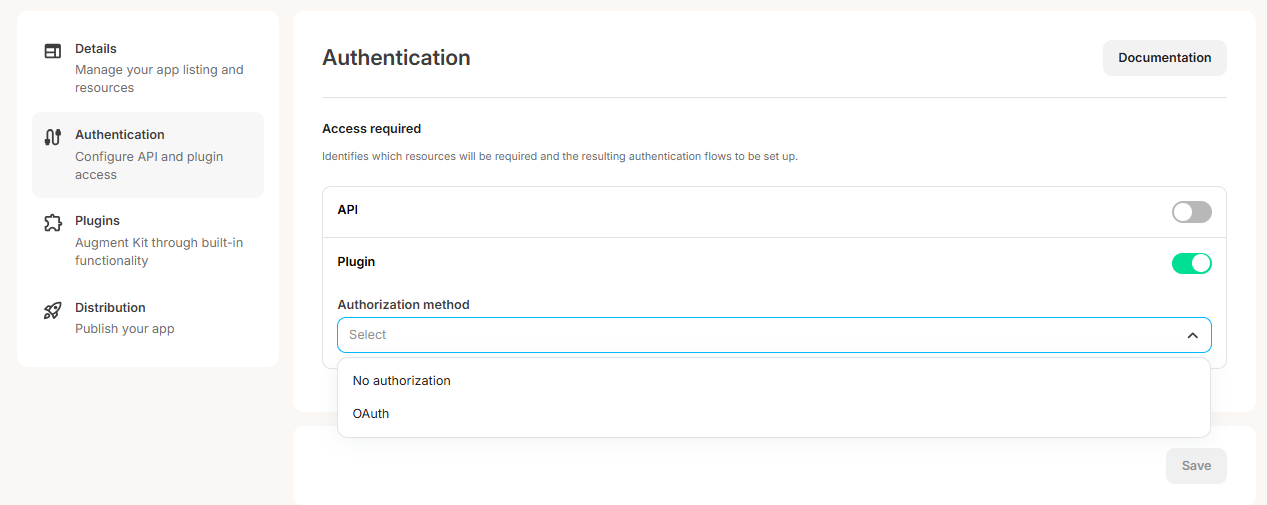
To set OAuth up for your app, go to the "Authentication" tab on your app, toggle on the "Plugin" section and select "OAuth" from the "Authorization method" dropdown:

<img width="800" alt="plugin authentication strategies" src="https://mintcdn.com/kit-314e57c1/ohR8KbVxvspIDffR/images/plugins/plugin-authentication-strategies.png?fit=max&auto=format&n=ohR8KbVxvspIDffR&q=85&s=d4deba45766b48e762d4ef1e177b1794" data-path="images/plugins/plugin-authentication-strategies.png" />

This will expand the section and offer the fields to add your:

* Authorization URL
* Token URL
* Refresh token URL
* Revoke URL

as well as the "Client ID" and "Client secret" fields for us to authenticate with your service:
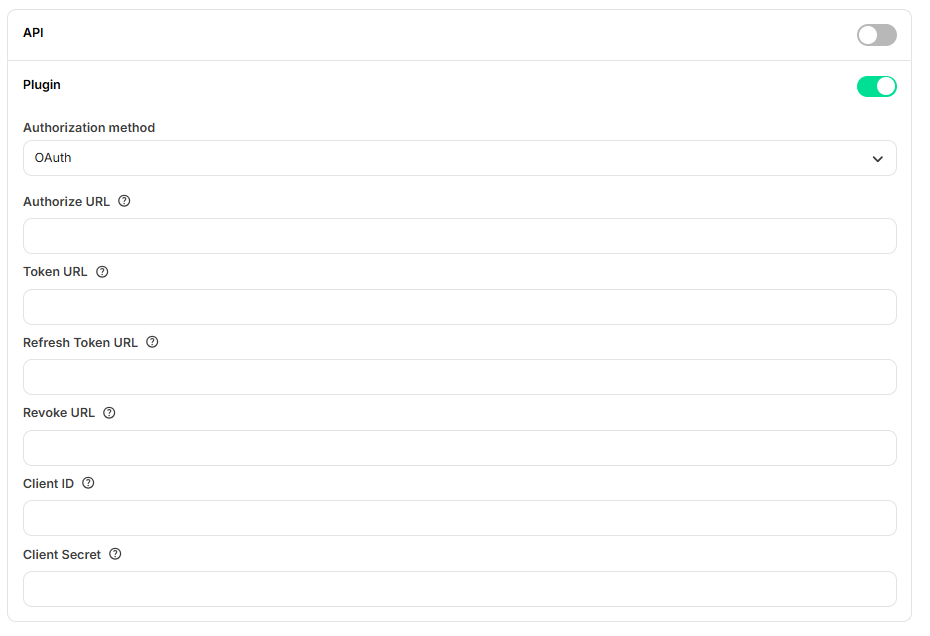
<img width="500" alt="OAuth authorization strategy UI" src="https://mintcdn.com/kit-314e57c1/ohR8KbVxvspIDffR/images/plugins/oauth-plugin-authorization-strategy-ui.png?fit=max&auto=format&n=ohR8KbVxvspIDffR&q=85&s=322c3f22672f37e414572572427052ea" data-path="images/plugins/oauth-plugin-authorization-strategy-ui.png" />

Once all of the fields are filled out, click save and OAuth will be set up for all plugins you create for the app.

### Post-installation redirect

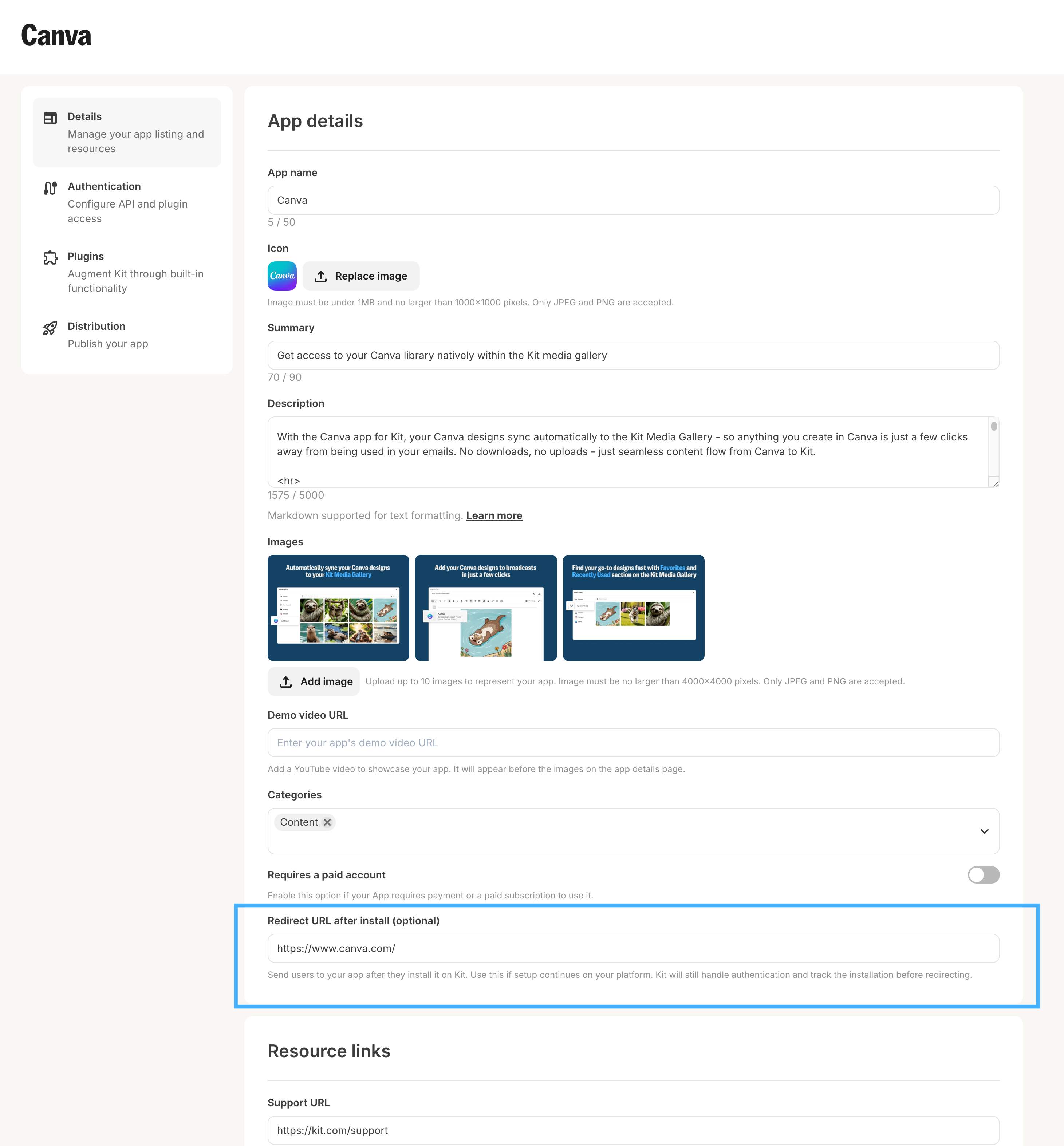
Your app may also include the option to alternatively send creators to your app, or an externally hosted onboarding flow, post signup. This can be configured using the `Redirect URL after install` field in your [app details setting page](/kit-app-store/app-details-page). An example of this flow can be seen below.
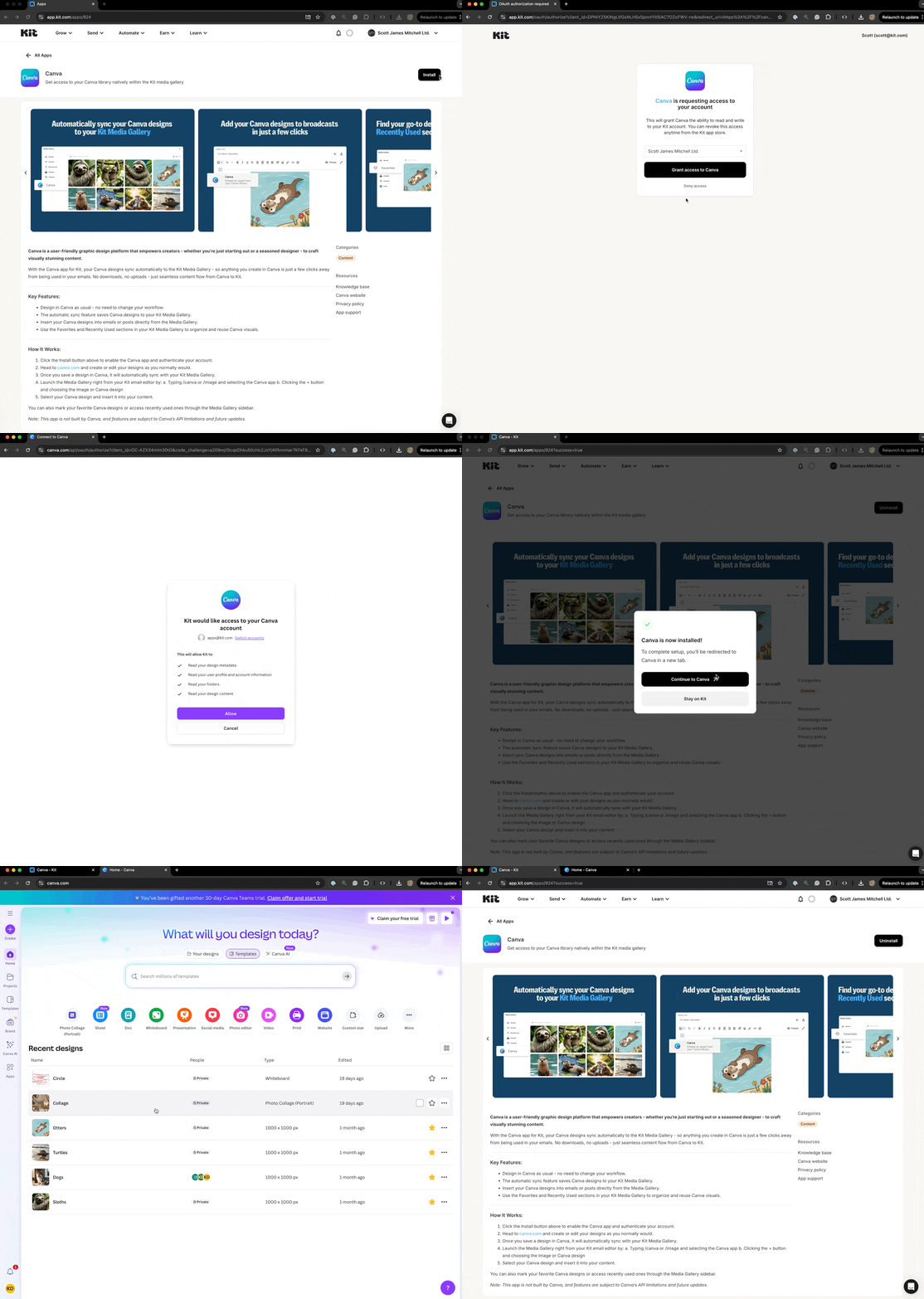
<AccordionGroup>
  <Accordion title="Example redirect flow">
    <img width="1000" alt="example redirect flow" src="https://mintcdn.com/kit-314e57c1/dSCrspkEWxNDV3Va/images/kit_app_store/example-redirect-flow.gif?s=a5edb0b666ed88fa29381ae689da5323" data-path="images/kit_app_store/example-redirect-flow.gif" />
  </Accordion>

  <Accordion title="Redirect flow settings">
    <img width="1000" alt="example redirect flow" src="https://mintcdn.com/kit-314e57c1/ohR8KbVxvspIDffR/images/kit_app_store/post-install-redirect-url.png?fit=max&auto=format&n=ohR8KbVxvspIDffR&q=85&s=524d65d71af958527a96898c664f774b" data-path="images/kit_app_store/post-install-redirect-url.png" />
  </Accordion>
</AccordionGroup>

### Plugin scopes

When configuring OAuth for your plugins, you're able to define scopes that specify which permissions your app requires from the creator's account. These scopes are managed in the plugin settings page and play a crucial role in app versioning and authentication.

##### Configuring Scopes

In the plugin settings page, you can define the scopes your plugin requires. Kit tracks these scopes cumulatively across all plugins in your app, which means:

* Each plugin can declare its own required scopes
* The total scopes for your app are the combined unique scopes from all active plugins
* Changes to cumulative scopes trigger app versioning

##### Scope Format Requirements

When defining scopes, follow these critical formatting rules:

* **Never include spaces in scope names** - Use underscores, hyphens, camel/snake case or colons instead
  * ❌ Incorrect: `"read data"`, `"write data"`
  * ✅ Correct: `"read:data"`, `"write:data"`, `"read_data"`
* Spaces cause serialization errors when scopes are processed as arrays or comma-separated strings
* Use consistent naming conventions across all your plugins (recommended format: `action:resource`)

##### When Scopes Trigger Re-authentication

Creators will be prompted to re-authenticate when:

* You add a new scope to any plugin that wasn't previously used by other plugins
* You create a new plugin with scopes not used by existing plugins
* The authorization strategy changes (for example, from "No authorization" to "OAuth")

Removing scopes does not require re-authentication, making it safe to reduce permissions without disrupting users.

##### Testing Scope Changes

When developing and testing scope changes:

* Plugins in test mode (created and have never been activated) require you to re-authenticate the app in your developer account when new scopes are added
* This allows you to verify the authentication flow before affecting production users
* Always test the complete OAuth flow with new scopes before publishing

##### Example

If your app has two plugins with the following scopes:

* **Product Gallery Plugin**: `read:products`, `read:inventory`
* **Customer Reviews Plugin**: `read:products`, `read:reviews`

Your app's cumulative scopes are: `read:products`, `read:inventory`, `read:reviews`

Adding `write:products` to either plugin would trigger a new app version and require re-authentication, while adding `read:products` to a new third plugin would not.

For comprehensive information about app versioning and its implications for both creators and developers, see the [App Versioning Guide](/kit-app-store/app-versioning).