> ## Documentation Index
> Fetch the complete documentation index at: https://developers.kit.com/llms.txt
> Use this file to discover all available pages before exploring further.
# Numerical input
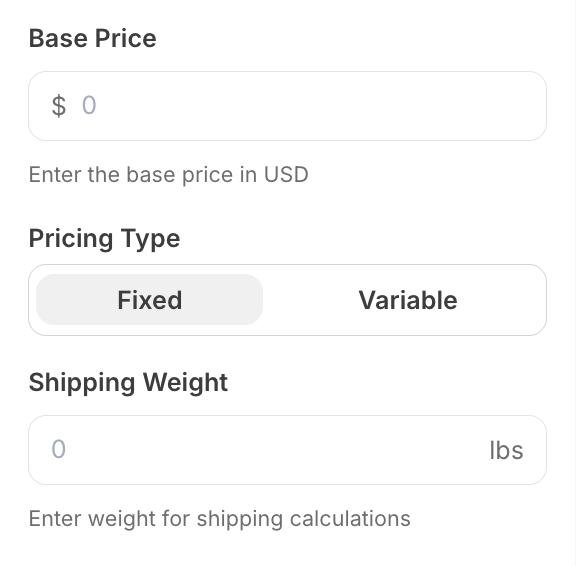
The numerical input allows creators to enter numeric values in a dedicated field with optional currency or unit indicators. It's perfect for collecting prices, quantities, measurements, or any numeric data that benefits from contextual prefixes or suffixes. The input provides a clean interface optimized for numerical data entry.
 ## Compatibility
| Plugin type | Availability | Additional notes |
| -------------- | ---------------------------- | ---------------- |
| Content blocks | | |
| Media source | | |
## Properties
`numericalInput` - the type of the component
A unique internal-only identifier that is posted to an app's plugin server to share values inputted by the creator
Creator-facing identifier that is shown in the plugin environment
Text or symbol displayed before the input field (e.g., "\$" for currency). Maximum 5 characters. Cannot be used with `append`.
Text or symbol displayed after the input field (e.g., "lbs" for weight). Maximum 5 characters. Cannot be used with `prepend`.
Maximum value allowed
Minimum value allowed
Default numeric value when the component first loads
Determines whether the creator must enter a value before proceeding
Brief creator-facing explanation that clarifies the component's purpose and usage. (256 character limit. Supports markdown: `[text](url)`, `**bold**`, and `*italic*`)
Allows for the field to be shown conditionally. dependent on other fields. See [dependencies page](/plugins/component-library/dependencies) for more details.
Name of the dependent field
Value for the dependent field required to show this field. To show when any value is inputted, leave out this property.
## Important Notes
* Either `prepend` or `append` must be provided, but not both
* The placeholder is automatically set to "0" and cannot be customized
* Input accepts decimal numbers and automatically validates numeric format
```json JSON setting with prepend theme={null}
{
"type": "numericalInput",
"name": "price",
"label": "Product Price",
"prepend": "$",
"max": 200, //optional
"min": 0, //optional
"default": 3, // optional
"required": true,
"help": "Enter the price in USD",
"dependencies": [
{
"field": "enable_pricing",
"value": true
}
]
}
```
```json Example response theme={null}
{
"settings": {
"price": "99.99",
"weight": "2.5"
}
}
```
## Compatibility
| Plugin type | Availability | Additional notes |
| -------------- | ---------------------------- | ---------------- |
| Content blocks | | |
| Media source | | |
## Properties
`numericalInput` - the type of the component
A unique internal-only identifier that is posted to an app's plugin server to share values inputted by the creator
Creator-facing identifier that is shown in the plugin environment
Text or symbol displayed before the input field (e.g., "\$" for currency). Maximum 5 characters. Cannot be used with `append`.
Text or symbol displayed after the input field (e.g., "lbs" for weight). Maximum 5 characters. Cannot be used with `prepend`.
Maximum value allowed
Minimum value allowed
Default numeric value when the component first loads
Determines whether the creator must enter a value before proceeding
Brief creator-facing explanation that clarifies the component's purpose and usage. (256 character limit. Supports markdown: `[text](url)`, `**bold**`, and `*italic*`)
Allows for the field to be shown conditionally. dependent on other fields. See [dependencies page](/plugins/component-library/dependencies) for more details.
Name of the dependent field
Value for the dependent field required to show this field. To show when any value is inputted, leave out this property.
## Important Notes
* Either `prepend` or `append` must be provided, but not both
* The placeholder is automatically set to "0" and cannot be customized
* Input accepts decimal numbers and automatically validates numeric format
```json JSON setting with prepend theme={null}
{
"type": "numericalInput",
"name": "price",
"label": "Product Price",
"prepend": "$",
"max": 200, //optional
"min": 0, //optional
"default": 3, // optional
"required": true,
"help": "Enter the price in USD",
"dependencies": [
{
"field": "enable_pricing",
"value": true
}
]
}
```
```json Example response theme={null}
{
"settings": {
"price": "99.99",
"weight": "2.5"
}
}
```