> ## Documentation Index
> Fetch the complete documentation index at: https://developers.kit.com/llms.txt
> Use this file to discover all available pages before exploring further.

# App details page

> Help creators get the most from your app by setting up a comprehensive app details page.

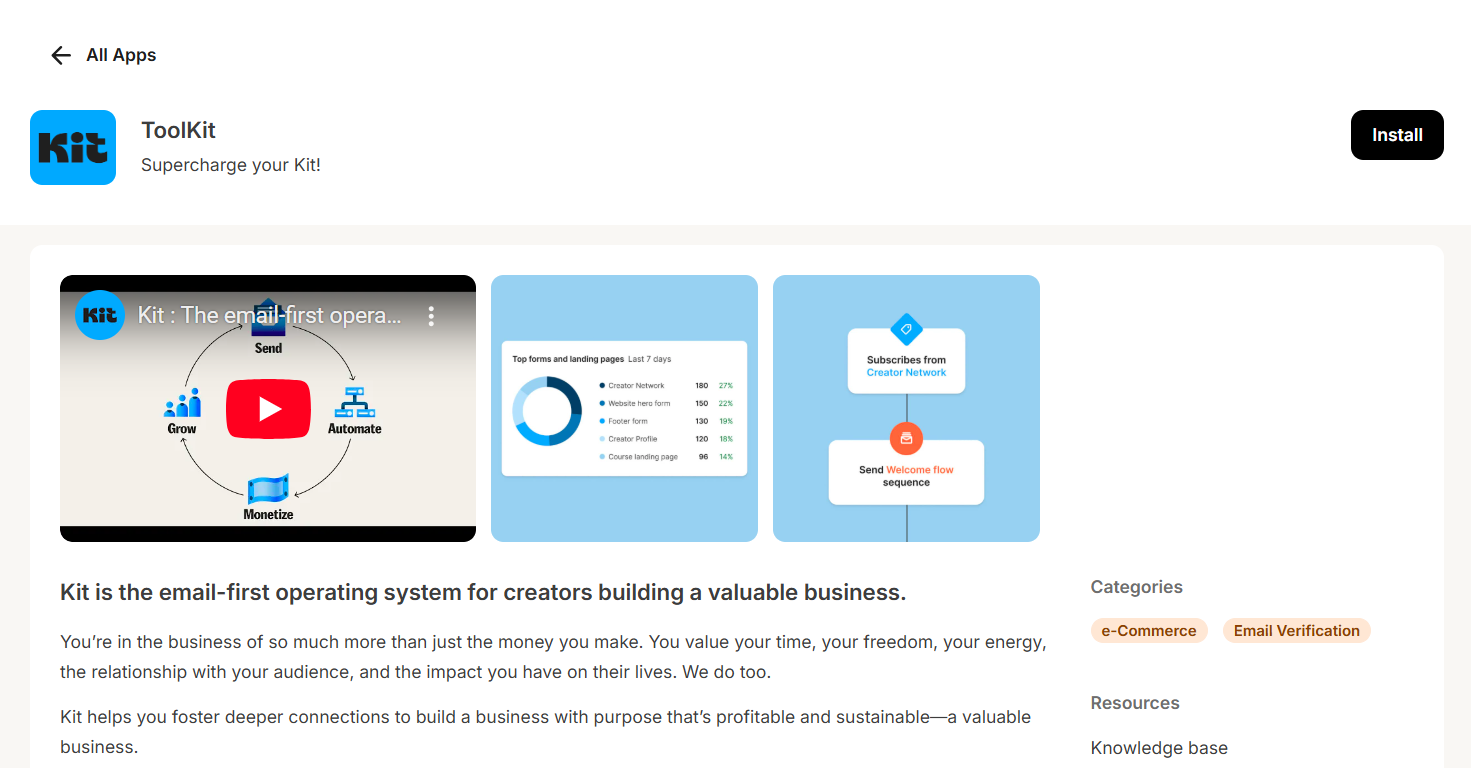
The app details page is your app's storefront and is also where creators land after installing your app, so make it count.

<img width="800" alt="app details page" src="https://mintcdn.com/kit-314e57c1/ohR8KbVxvspIDffR/images/kit_app_store/toolkit-app-details-page.png?fit=max&auto=format&n=ohR8KbVxvspIDffR&q=85&s=2abaf6af10a9b255d231f4c4bfc832d0" data-path="images/kit_app_store/toolkit-app-details-page.png" />

## What to include

Your app details page needs:

* A clear description of what your app does
* Setup instructions
* Links to documentation
* Link to where any settings for your app are hosted
* Support information
* Images and videos to help your app stand out

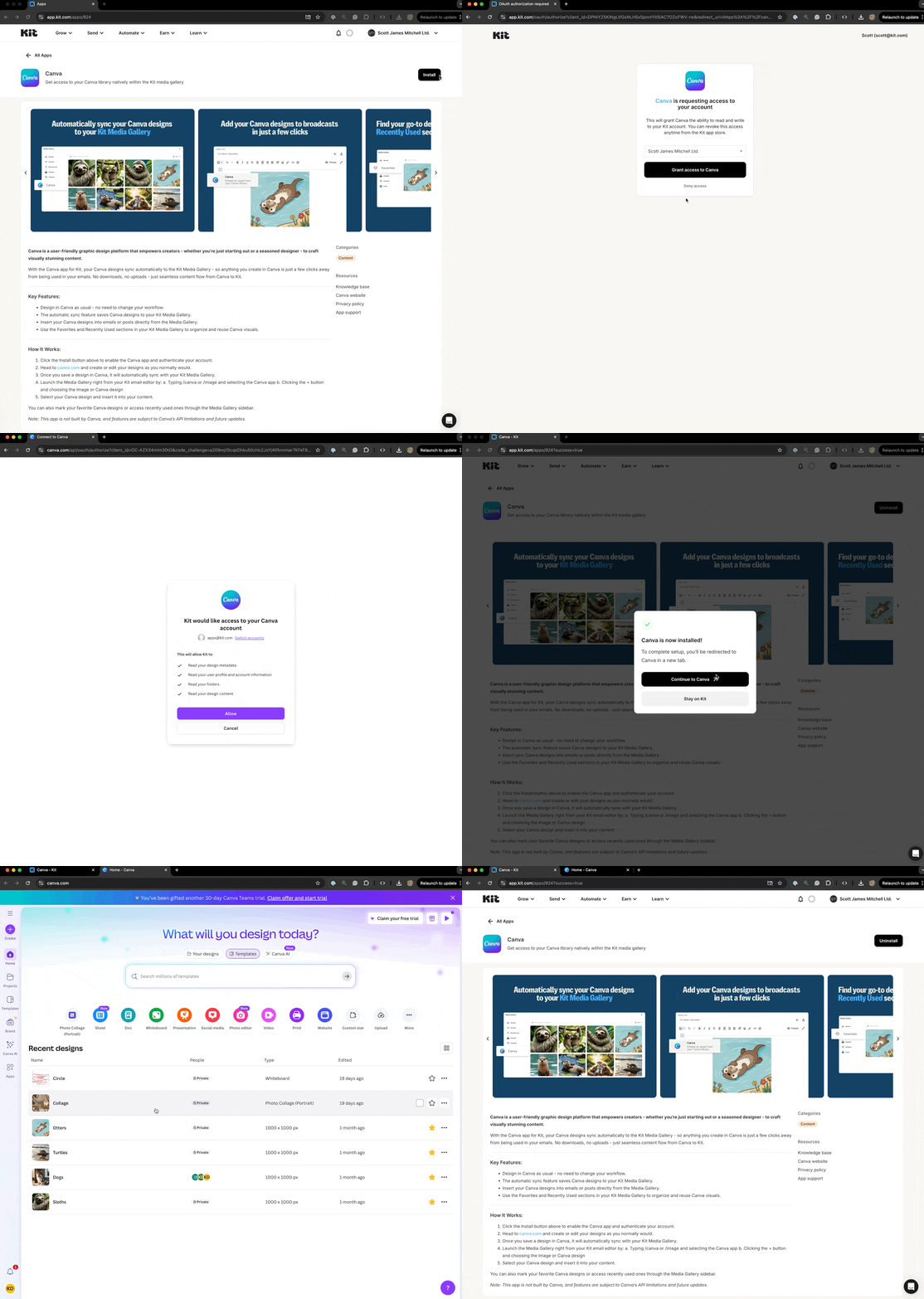
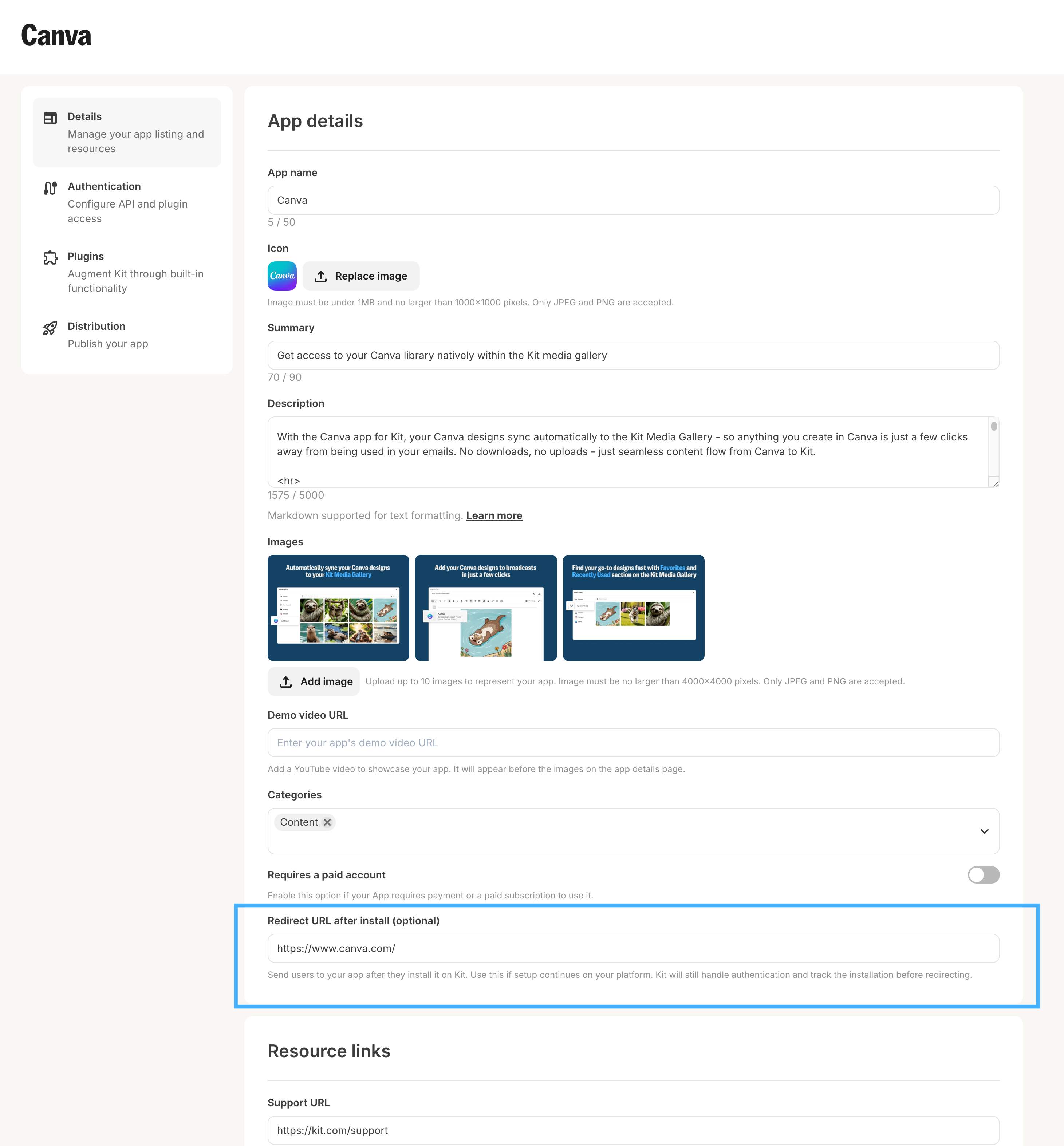
It may also include the option to alternatively send creators to your app, or an externally hosted onboarding flow, post signup. This can be configured using the `Redirect URL after install` field. An example of this flow can be seen below.
<AccordionGroup>
  <Accordion title="Example redirect flow">
    <img width="1000" alt="example redirect flow" src="https://mintcdn.com/kit-314e57c1/dSCrspkEWxNDV3Va/images/kit_app_store/example-redirect-flow.gif?s=a5edb0b666ed88fa29381ae689da5323" data-path="images/kit_app_store/example-redirect-flow.gif" />
  </Accordion>

  <Accordion title="Redirect flow settings">
    <img width="1000" alt="example redirect flow" src="https://mintcdn.com/kit-314e57c1/ohR8KbVxvspIDffR/images/kit_app_store/post-install-redirect-url.png?fit=max&auto=format&n=ohR8KbVxvspIDffR&q=85&s=524d65d71af958527a96898c664f774b" data-path="images/kit_app_store/post-install-redirect-url.png" />
  </Accordion>
</AccordionGroup>

## How to configure

Go to the top navigation menu ["Automate" > "Apps" > "Build"](https://app.kit.com/apps?is=created).

From there, click your app's "Edit" button to display a form with fields for the app details page. Then, update these key fields:

| **Field**                  | **What it's for**                                                                                                                                                                                                       | **Restriction**                                                        | **Required for publishing** |
| -------------------------- | ----------------------------------------------------------------------------------------------------------------------------------------------------------------------------------------------------------------------- | ---------------------------------------------------------------------- | --------------------------- |
| App name                   | The name the creators see for your app across the entire Kit platform                                                                                                                                                   | 50 characters                                                          | ✅                           |
| Icon                       | Your app icon, which will be shown in all places where your app can be installed and used.                                                                                                                              | Under 1 MB and 1,000 x1,000 pixels. Only JPEG and PNG are accepted.    | ✅                           |
| Summary                    | A short description that helps market your app, primarily shown in the card for your app on the Kit App Store main page                                                                                                 | 90 characters                                                          | ✅                           |
| Description                | A longer description with markdown support that helps creators understand the value your app brings them, the functionality, and how to use it. It's your opportunity to sell yourself to our massive creator base.     | 5,000 characters                                                       | ✅                           |
| Images                     | Images of your app to give creators a visual representation of what it looks like and the functionality available                                                                                                       | Up to 10 images, 4,000 x 4,000 pixels. Only JPEG and PNG are accepted. | ✅                           |
| Demo video URL             | A video that demonstrates your app in action, to drive installations. If available, the video will appear before your app images.                                                                                       | YouTube video URLs only                                                |                             |
| Categories                 | The category (or categories) your app belongs to                                                                                                                                                                        |                                                                        | ✅                           |
| Requires a paid account    | A toggle that identifies whether a paid account is required to use your app                                                                                                                                             |                                                                        | ✅                           |
| Redirect URL after install | Send users to your app, or an external onboarding flow, after they install it on Kit. Use this if setup continues on your platform. Kit will still handle authentication and track the installation before redirecting. | valid https URL                                                        |                             |
| Support URL                | Tell your users where to reach out to if they encounter issues using your app                                                                                                                                           | valid https URL                                                        | ✅                           |
| Help article URL           | A knowledge base/help center article for working with your app                                                                                                                                                          | valid https URL                                                        | ✅                           |
| Home page URL              | Your app website URL                                                                                                                                                                                                    | valid https URL                                                        | ✅                           |
| App settings URL           | A URL that takes creators to a page in your app that allows them to manage the functionality of your app - from tag/custom field mapping, sync preferences and much more                                                | valid https URL                                                        |                             |
| Privacy Policy URL         | A link to your privacy policy                                                                                                                                                                                           | valid https URL                                                        | ✅                           |

## Markdown support

We currently offer the following markdown support for the app description:

* Headings
  * `# Heading 1`
  * `## Heading 2`
* Lists
  * Unordered lists:
    * `- item 1`
    * `- item 2`
  * Ordered lists:
    * `1. Item 1`
    * `2. Item 2`
* Formatting
  * `**bold**`
  * `*italic*`
  * `<u>underline</u>`
* URL
  * `[URL text](url)`

<Note>For ease, we recommend using a free online markdown converter tool to help visualise your content as you draft it out, [such as this](https://markdowntohtml.com/), or utilize an LLM to convert the styling for you automatically.</Note>

## Redirect handling

The OAuth redirect parameter automatically sends creators to your app details page after authentication. The URL format is: [https://app.kit.com/apps/\{app\_id}](https://app.kit.com/apps/\{app_id})

<Note>If you have already published an app, no changes are needed if you're using our dynamic redirect parameter. Your creators will seamlessly move from installation to your getting started guide. Otherwise, you will need to update your authentication flow to end on the redirect parameter appended to the initial call to your configured `authorization URL`</Note>

## Sharing your app with creators

Once you've populated the app details page form, click "Save" to save your changes.

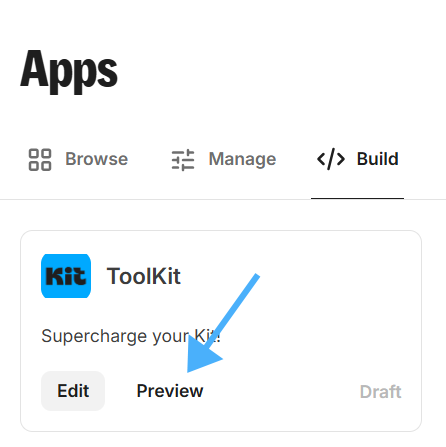
You can now go back to the [Build](https://app.kit.com/apps?is=created) page and select your app's "Preview" option to preview its app details page:

<img width="400" alt="app details preview" src="https://mintcdn.com/kit-314e57c1/dSCrspkEWxNDV3Va/images/kit_app_store/app-preview-button.png?fit=max&auto=format&n=dSCrspkEWxNDV3Va&q=85&s=60955b4ef8b71fd32dbdb4adebfc81b5" data-path="images/kit_app_store/app-preview-button.png" />

## Best practices

Your App Details Page is the primary way creators discover, learn about, and evaluate your app. For installation, it serves as both an educational and sales tool for convincing creators to try your app. Below are the components of a good App Details page:

<Steps>
  <Step title="Clear and Compelling Description:">
    Highlight your app’s purpose and how it enhances the creator’s experience. Include benefits for both the Kit integration and standalone use
  </Step>

  <Step title="Standalone & App-Specific Functionality:">
    Describe how the app works within Kit and what it offers independently as a standalone experience
  </Step>

  <Step title="Feature Set:">
    Provide a concise breakdown of key features and their value
  </Step>

  <Step title="Visual Content:">
    <p>Best Practice: At least 2-3 high-quality images showcasing app functionality along with an annotation on features or benefits of the App - examples:</p>

    <img width="800" alt="app details images" src="https://mintcdn.com/kit-314e57c1/dSCrspkEWxNDV3Va/images/kit_app_store/app-details-images.png?fit=max&auto=format&n=dSCrspkEWxNDV3Va&q=85&s=7bb7cbda846b37fb50923b54bea7cb9b" data-path="images/kit_app_store/app-details-images.png" />
  </Step>

  <Step title="App Settings Configuration:">
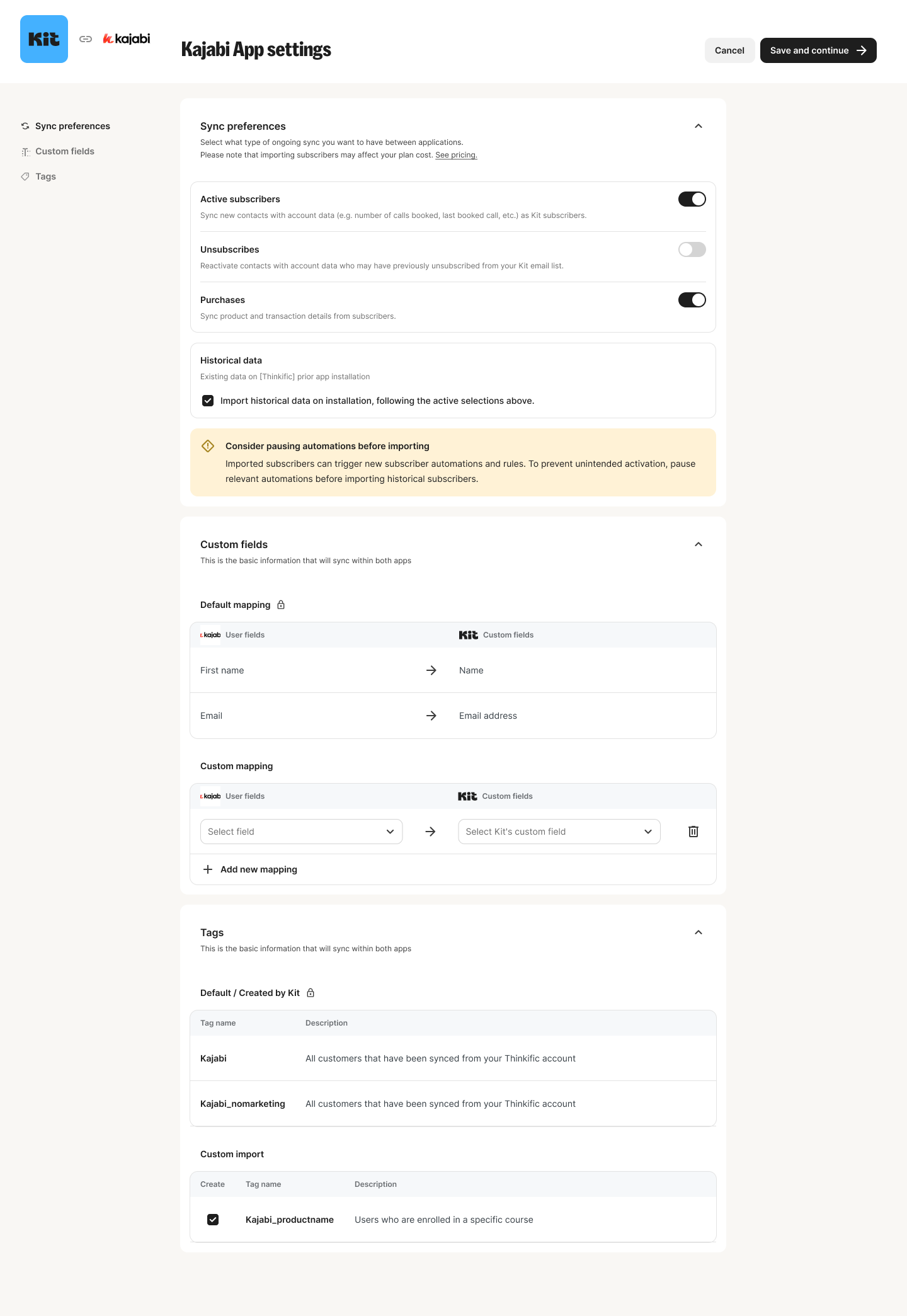
    <p>A configuration page lets creators customize how your app integrates with their Kit account—such as choosing which custom fields sync, toggling features on/off, or performing historical imports. This flexibility lets creators tailor the integration to their needs without unnecessary complexity. An example can be found below:</p>

    <img width="800" alt="app setting page" src="https://mintcdn.com/kit-314e57c1/Q2NNTnO7PH_rJW9Y/images/kit_app_store/app-settings-page.png?fit=max&auto=format&n=Q2NNTnO7PH_rJW9Y&q=85&s=16f8a3d092fa9f9732801a83c4f239d6" data-path="images/kit_app_store/app-settings-page.png" />
  </Step>

  <Step title="Support Resources:">
    * A general link to your app/platform support documentation
    * A Help Center Article specific to your Kit integration with:
      * Clear setup instructions
      * FAQs addressing common creator questions
  </Step>

  <Step title="An app video:">
    Adding a video to your app details page allows you to market your app to Kit creators even further, showcasing the benefits of your app in a new engaging way
  </Step>
</Steps>

For an example of a high-quality App Details page, [click here](https://app.kit.com/apps/924).