> ## Documentation Index
> Fetch the complete documentation index at: https://developers.kit.com/llms.txt
> Use this file to discover all available pages before exploring further.

# OAuth refresh token flow

This guide will help you understand how to set up a standard refresh token flow for an OAuth app. For more details on which flow to use or how to set up your OAuth app within Kit, please refer to the [more general "Authentication" guide](/api-reference/authentication).

We also offer example OAuth implementations that can be viewed below:

<AccordionGroup>
  <Accordion title="OmniAuth Kit Ruby gem">
    <a href="https://github.com/Kit/omniauth-kit-oauth2/" target="_blank">
      <img width="600" noZoom alt="View Oauth2 strategy for Kit on Github" src="https://opengraph.githubassets.com/1b490d4056befa338481c1e9d2575118ecc8365350ee58aed69db086568eb627/Kit/omniauth-kit-oauth2" />
    </a>
  </Accordion>

  <Accordion title="Node.js example">
    See an example of authenticating with [Kit's OAuth Server in Node.js here](https://github.com/Kit/app-demos/tree/17077153aed0fc2475054e267813c2a3f147195e/oauth-express)
  </Accordion>
</AccordionGroup>

## OAuth refresh token flow

<Steps>
  <Step title="User initiates install from Kit's App Store">
    When a user installs your app from the Kit App Store, Kit redirects them to the `Authorization URL` you've configured.

    ```
    https://example.com/kit/oauth?redirect=https://app.kit.com/apps/1?success=true
    ```

    From here, your app should present the user a screen to sign in (or sign up).
    <Note> Kit will append a redirect query parameter to your Authorization URL that you will need to save in order to complete the flow.</Note>
  </Step>

  <Step title="App requests user's Kit identity">
    After the user successfully authenticates with your app, redirect them to Kit's OAuth server to request their identity.
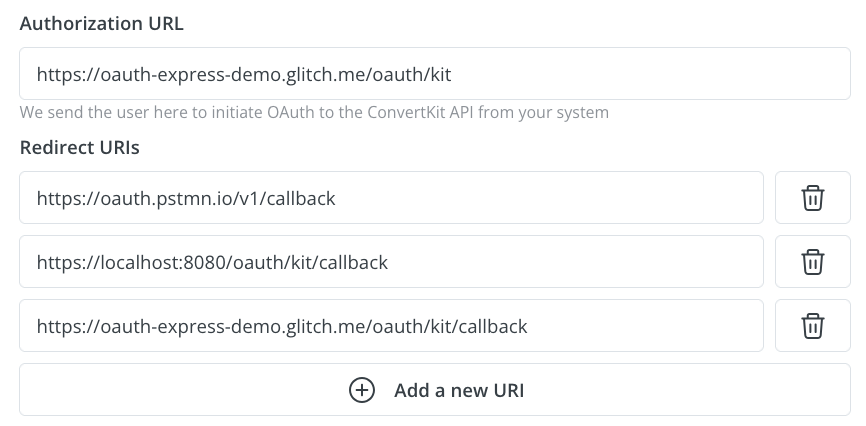
    <Note>The value supplied to redirect\_uri must be one of the Redirect URIs configured in your app's settings, found on the *Distribution* tab.</Note>

    <AccordionGroup>
      <Accordion title="Example redirect">
        ```http theme={null}
            https://api.kit.com/v4/oauth/authorize?
                client_id=YOUR_CLIENT_ID&
                response_type=code&
                redirect_uri=https://oauth2.example.com/callback&
                state=DEF456
        ```
      </Accordion>

      <Accordion title="Query parameters">
        <ResponseField name="client_id" type="string" required={true}>
          Your app's Client ID
        </ResponseField>

        <ResponseField name="response_type" type="string" required={true}>
          `code`
        </ResponseField>

        <ResponseField name="redirect_uri" type="string" required={true}>
          URI to redirect to
        </ResponseField>

        <ResponseField name="scope" type="string" required={false}>
          Default scope is `public`. Fine-grained access control via scopes coming soon.
        </ResponseField>

        <ResponseField name="state" type="string" required={false}>
          Custom state to pass to the `redirect_uri` and/or to protect from XSRF
        </ResponseField>

        <ResponseField name="tenant_name" type="string" required={false}>
          Unique, human-readable identifier for a tenant of a multi-tenant app.
        </ResponseField>
      </Accordion>

      <Accordion title="Example Kit app configuration">
        Found on the "Authentication" tab in your app settings:

        <img width="600" alt="Example Kit app configuration" src="https://mintcdn.com/kit-314e57c1/dSCrspkEWxNDV3Va/images/api/oauth-kit-app-configuration.png?fit=max&auto=format&n=dSCrspkEWxNDV3Va&q=85&s=16688485e58bb23aeaff5711cd8648f0" data-path="images/api/oauth-kit-app-configuration.png" />
      </Accordion>
    </AccordionGroup>
  </Step>

  <Step title="Kit prompts user for consent">
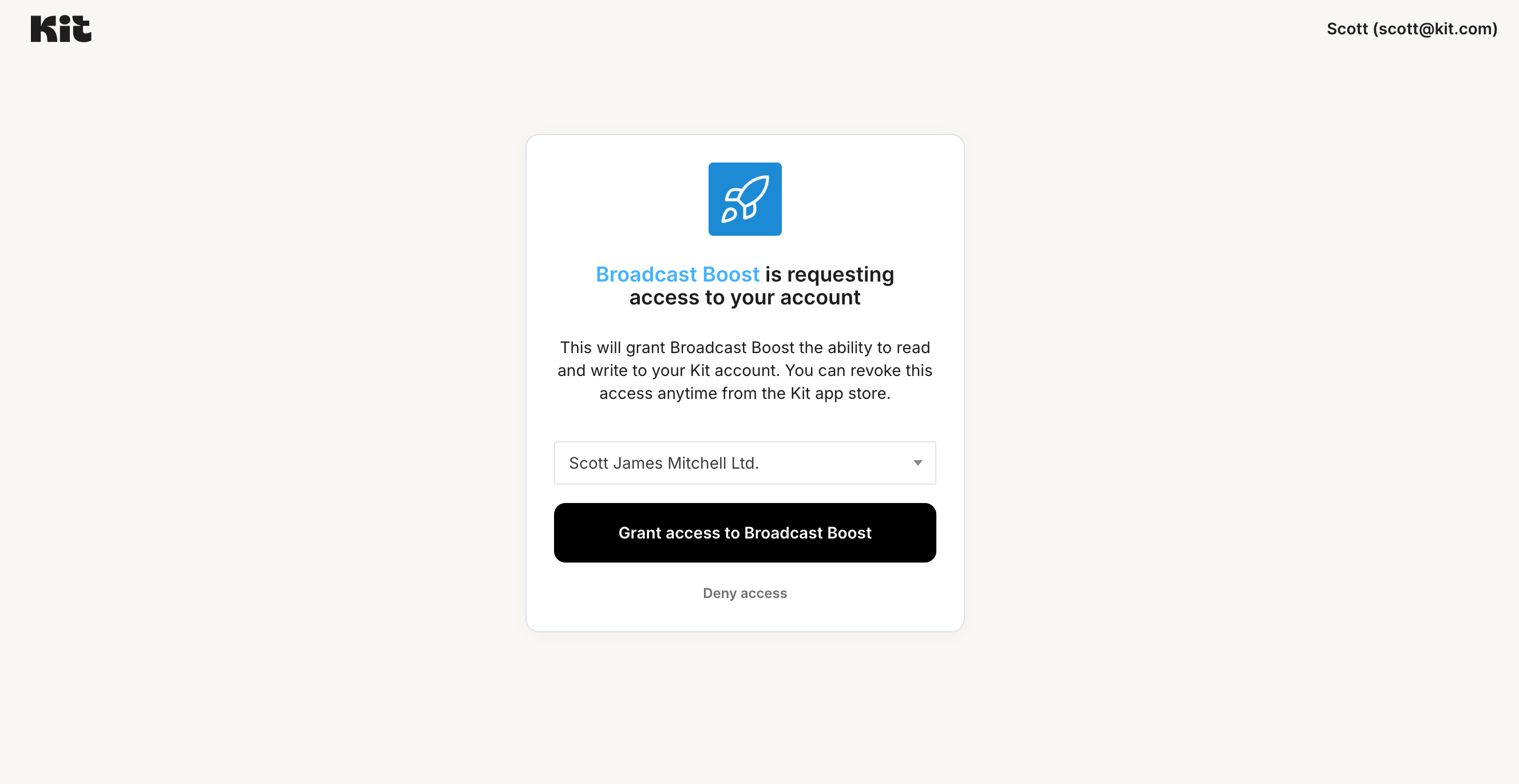
    Kit will present a consent screen that asks the user to grant or refuse your app access to their account.

    <Accordion title="Example Kit app OAuth page">
      <img width="600" alt="Kit OAuth page" src="https://mintcdn.com/kit-314e57c1/dSCrspkEWxNDV3Va/images/kit_app_store/kit-oauth-page.png?fit=max&auto=format&n=dSCrspkEWxNDV3Va&q=85&s=d094f2ce66f7d5eda956bd405895218f" data-path="images/kit_app_store/kit-oauth-page.png" />
    </Accordion>
  </Step>

  <Step title="Kit redirects to App OAuth callback with authorization code">
    If the user grants access, Kit redirects the user back to the `redirect_uri` you provided when requesting the user's identity in step 2.
    <p>Kit appends a `code` query param with a temporary authorization code.</p>
    <Note>Kit also appends a state query param with the same value sent in the authorization request. This check helps verify that the user, not a malicious script, is making the request and reduces the risk of CSRF attacks.</Note>

    <Accordion title="Example redirect">
      ```
      https://oauth2.example.com/callback?
          code=mrApixZzMPnYO28KoeIZxn2mvom1Tx48S9iyrQVYVE8&
          state=DEF456
      ```
    </Accordion>
  </Step>

  <Step title="App exchanges authorization code for refresh and access tokens">
    Your app uses the authorization code provided to obtain a refresh and access token.

    ```
        POST https://api.kit.com/v4/oauth/token
    ```

    With a body like so:

    ```json theme={null}
        {
            "client_id": "YOUR_CLIENT_ID",
            "client_secret": "YOUR_CLIENT_SECRET",
            "grant_type": "authorization_code",
            "code": "abc123",
            "redirect_uri": "https://oauth2.example.com/callback"
        }
    ```

    <AccordionGroup>
      <Accordion title="Query parameters">
        <ResponseField name="client_id" type="string" required={true}>
          Your app's Client ID
        </ResponseField>

        <ResponseField name="client_secret" type="string" required={true}>
          Your app's Client Secret
        </ResponseField>

        <ResponseField name="grant_type" type="string" required={true}>
          `authorization_code`
        </ResponseField>

        <ResponseField name="code" type="string" required={false}>
          The code received via the redirect uri query params
        </ResponseField>

        <ResponseField name="redirect_uri" type="string" required={false}>
          The redirect URI the request is coming from (must be one of your app's redirect URIs)
        </ResponseField>
      </Accordion>

      <Accordion title="Code samples">
        <CodeGroup>
          ```shell shell theme={null}
              curl -X POST https://api.kit.com/v4/oauth/token \
                  -H 'Content-Type: application/json' \
                  -H 'Accept: application/json' \
                  -d '{
                      "client_id": "YOUR_CLIENT_ID",
                      "client_secret": "YOUR_CLIENT_SECRET",
                      "grant_type": "authorization_code",
                      "code": "abc123",
                      "redirect_uri": "https://oauth2.example.com/callback"
                  }'
          ```

          ```javascript Javascript theme={null}
              const headers = {
                  'Content-Type':'application/json',
                  'Accept':'application/json'
              };
              const inputBody = '{
                  "client_id": "YOUR_CLIENT_ID",
                  "client_secret": "YOUR_CLIENT_SECRET",
                  "grant_type": "authorization_code",
                  "code": "abc123",
                  "redirect_uri": "https://oauth2.example.com/callback"
              }';

              fetch('https://api.kit.com/v4/oauth/token',
              {
                  method: 'POST',
                  body: inputBody,
                  headers: headers
              })
              .then(function(res) {
                  return res.json();
              }).then(function(body) {
                  console.log(body);
              });
          ```

          ```ruby Ruby theme={null}
              require 'rest-client'
              require 'json'

              headers = {
                  'Content-Type' => 'application/json',
                  'Accept' => 'application/json'
              }
              payload = {
                  "client_id" => "YOUR_CLIENT_ID",
                  "client_secret" => "YOUR_CLIENT_SECRET",
                  "grant_type" => "authorization_code",
                  "code" => "abc123",
                  "redirect_uri" => "https://oauth2.example.com/callback"
              }

              result = RestClient.post 'https://api.kit.com/v4/oauth/token', payload,
                  params: {
                  }, headers: headers

              p JSON.parse(result)
          ```

          ```python Python theme={null}
              import requests
              headers = {
                  'Content-Type': 'application/json',
                  'Accept': 'application/json'
              }
              json = {
                  "client_id": "YOUR_CLIENT_ID",
                  "client_secret": "YOUR_CLIENT_SECRET",
                  "grant_type": "authorization_code",
                  "code": "abc123",
                  "redirect_uri": "https://oauth2.example.com/callback"
              }

              r = requests.post('https://api.kit.com/v4/oauth/token', headers = headers, json = json)

              print(r.json())

          ```
        </CodeGroup>
      </Accordion>

      <Accordion title="Example response">
        **200**: Returns a token

        ```json theme={null}
        {
            "access_token": "YOUR_ACCESS_TOKEN_HERE",
            "token_type": "Bearer",
            "expires_in": 172800,
            "refresh_token": "YOUR_REFRESH_TOKEN_HERE",
            "scope": "public",
            "created_at": 1710270147
        }
        ```

        <p>Response schema: *application/json*</p>

        <ResponseField name="access_token" type="string" required={true}>
          Access token that can be used to make API requests on behalf of the authenticated user
        </ResponseField>

        <ResponseField name="token_type" type="string" required={true}>
          `Bearer`
        </ResponseField>

        <ResponseField name="expires_in" type="integer" required={true}>
          When the access token expire in seconds
        </ResponseField>

        <ResponseField name="refresh_token" type="string" required={true}>
          Refresh token that can be used to generate a new access token once this one expires
        </ResponseField>

        <ResponseField name="scope" type="string" required={true}>
          The scopes available for the access token
        </ResponseField>

        <ResponseField name="created_at" type="integer" required={true}>
          When the access token was created
        </ResponseField>
      </Accordion>
    </AccordionGroup>
  </Step>

  <Step title="App redirects user back to Kit">
    Now that the user has completed the OAuth flow, your app must send the the user back to Kit using the `redirect` parameter provided at the beginning of the flow.
    <p>This will ensure the user properly navigates back to your app inside of Kit and registers that the app has been installed. </p>
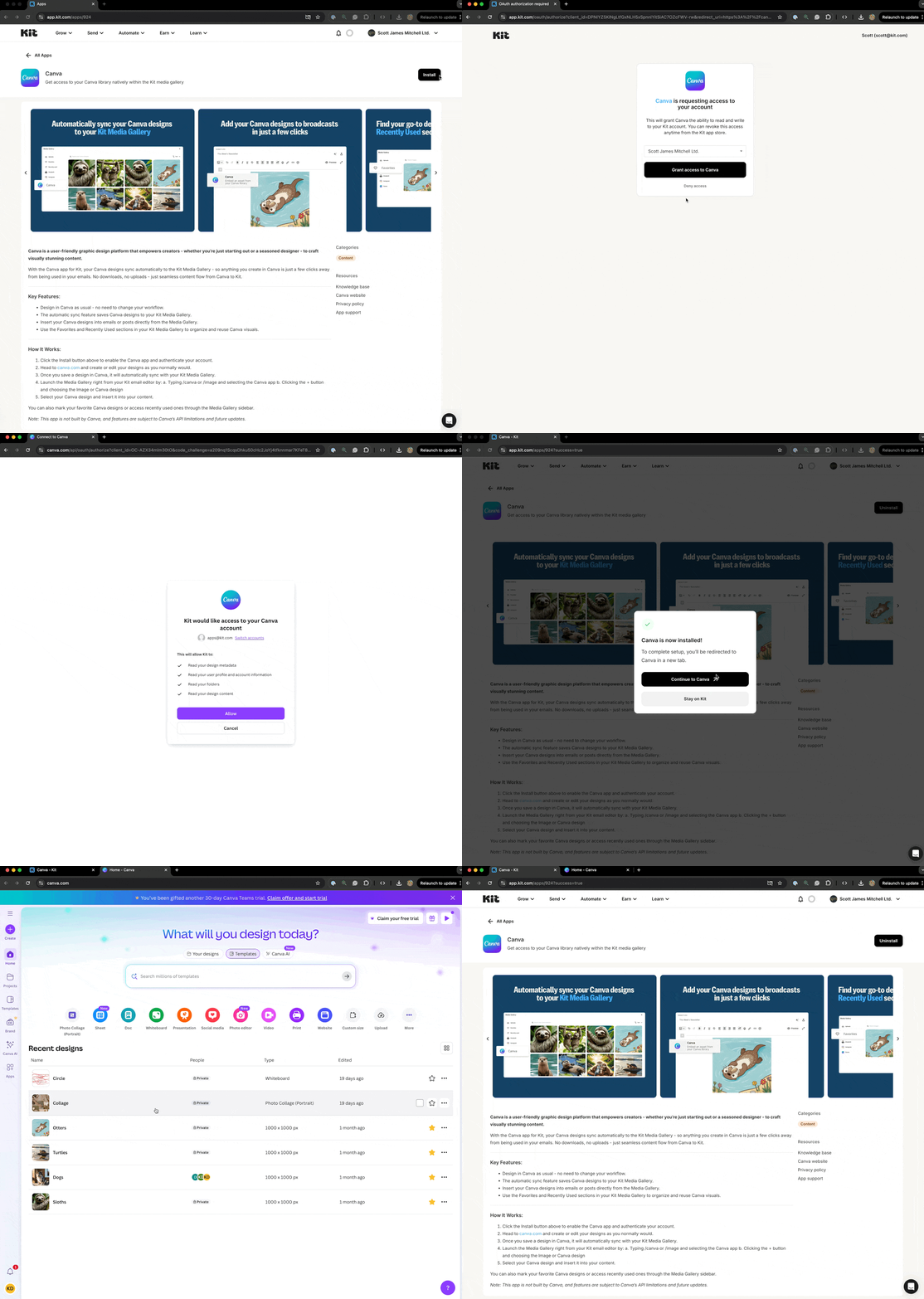
    <Note>If you have set up the `Redirect URL after install` field in your app's settings, a modal prompting creators to continue their journey on your configured site will appear at this point. See this section in the [app details page guide](/kit-app-store/app-details-page#how-to-configure) for more details.</Note>

    <Accordion title="Example redirect flow">
      <img width="1000" alt="example redirect flow" src="https://mintcdn.com/kit-314e57c1/dSCrspkEWxNDV3Va/images/kit_app_store/example-redirect-flow.gif?s=a5edb0b666ed88fa29381ae689da5323" data-path="images/kit_app_store/example-redirect-flow.gif" />
    </Accordion>
  </Step>

  <Step title="App uses access token to make Kit API calls">
    Your app can now make calls to Kit's API on behalf of the user by passing a `Authorization` header with the token as a `Bearer` value.

    <Accordion title="Code samples">
      <CodeGroup>
        ```shell shell theme={null}
            curl -X GET https://api.kit.com/v4/account \
                -H 'Accept: application/json' \
                -H 'Authorization: Bearer YOUR_ACCESS_TOKEN_HERE'
        ```

        ```javascript Javascript theme={null}
            const headers = {
                'Accept':'application/json',
                'Authorization':'Bearer YOUR_ACCESS_TOKEN_HERE'
            };

            fetch('https://api.kit.com/v4/account',
            {
                method: 'GET',
                headers: headers
            })
            .then(function(res) {
                return res.json();
            }).then(function(body) {
                console.log(body);
            });
        ```

        ```ruby Ruby theme={null}
            require 'rest-client'
            require 'json'

            headers = {
                'Accept' => 'application/json',
                'Authorization' => 'Bearer YOUR_ACCESS_TOKEN_HERE'
            }

            result = RestClient.get 'https://api.kit.com/v4/account',
                params: {
                }, headers: headers

            p JSON.parse(result)
        ```

        ```python Python theme={null}
            import requests
            headers = {
                'Accept': 'application/json',
                'Authorization': 'Bearer YOUR_ACCESS_TOKEN_HERE'
            }

            r = requests.get('https://api.kit.com/v4/account', headers = headers)

            print(r.json())
        ```
      </CodeGroup>
    </Accordion>
  </Step>

  <Step title="App uses refresh token to obtain new access token after expiration">
    The access token will eventually expire and a new one must be obtained using the refresh token obtained earlier. To do this, make a `POST` call to `https://api.kit.com/v4/oauth/token`, with the following body:

    ```json theme={null}
        {
            "client_id": "YOUR_CLIENT_ID",
            "grant_type": "refresh_token",
            "refresh_token": "abc123"
        }
    ```

    <AccordionGroup>
      <Accordion title="Query parameters">
        <ResponseField name="client_id" type="string" required={true}>
          Your app's Client ID
        </ResponseField>

        <ResponseField name="grant_type" type="string" required={true}>
          `refresh_token`
        </ResponseField>

        <ResponseField name="refresh_token" type="string" required={true}>
          The refresh token
        </ResponseField>
      </Accordion>

      <Accordion title="Code samples">
        <CodeGroup>
          ```shell shell theme={null}
          curl -X POST https://api.kit.com/v4/oauth/token \
              -H 'Content-Type: application/json' \
              -H 'Accept: application/json' \
              -d '{
                  "client_id": "YOUR_CLIENT_ID",
                  "grant_type": "refresh_token",
                  "code": "abc123"
              }'
          ```

          ```javascript Javascript theme={null}
              const headers = {
                  'Content-Type':'application/json',
                  'Accept':'application/json'
              };
              const inputBody = '{
                  "client_id": "YOUR_CLIENT_ID",
                  "grant_type": "refresh_token",
                  "code": "abc123"
              }';

              fetch('https://api.kit.com/v4/oauth/token',
              {
                  method: 'POST',
                  body: inputBody,
                  headers: headers
              })
              .then(function(res) {
                  return res.json();
              }).then(function(body) {
                  console.log(body);
              });
          ```

          ```ruby Ruby theme={null}
              require 'rest-client'
              require 'json'

              headers = {
                  'Content-Type' => 'application/json',
                  'Accept' => 'application/json'
              }
              payload = {
                  "client_id" => "YOUR_CLIENT_ID",
                  "grant_type" => "refresh_token",
                  "code" => "abc123"
             }

              result = RestClient.post 'https://api.kit.com/v4/oauth/token', payload,
                  params: {
                  }, headers: headers

              p JSON.parse(result)
          ```

          ```python Python theme={null}
              import requests
              headers = {
                  'Content-Type': 'application/json',
                  'Accept': 'application/json'
              }
              json = {
                  "client_id": "YOUR_CLIENT_ID",
                  "grant_type": "refresh_token",
                  "code": "abc123"
              }

              r = requests.post('https://api.kit.com/v4/oauth/token', headers = headers, json = json)

              print(r.json())
          ```
        </CodeGroup>
      </Accordion>

      <Accordion title="Example response">
        **200**: Returns a token

        ```json theme={null}
            {
                "access_token": "YOUR_NEW_ACCESS_TOKEN_HERE",
                "token_type": "Bearer",
                "expires_in": 7200,
                "refresh_token": "YOUR_NEW_REFRESH_TOKEN_HERE",
                "scope": "public",
                "created_at": 1710271006
            }
        ```

        <p>Response schema: *application/json*</p>

        <ResponseField name="access_token" type="string" required={true}>
          Access token that can be used to make API requests on behalf of the authenticated user
        </ResponseField>

        <ResponseField name="token_type" type="string" required={true}>
          `Bearer`
        </ResponseField>

        <ResponseField name="expires_in" type="integer" required={true}>
          When the access token expire in seconds
        </ResponseField>

        <ResponseField name="refresh_token" type="string" required={true}>
          Refresh token that can be used to generate a new access token once this one expires
        </ResponseField>

        <ResponseField name="scope" type="string" required={true}>
          The scopes available for the access token
        </ResponseField>

        <ResponseField name="created_at" type="integer" required={true}>
          When the access token was created
        </ResponseField>
      </Accordion>
    </AccordionGroup>
  </Step>
</Steps>